



























For General Contractors

More jobs. Same team. One system.

Built by a working general contractor around real jobsite workflows, smrtGC helps PMs run more jobs without status meetings, spreadsheet toggling or guesswork.

  • Live in 10 to 14 days
  • Flat fee
  • Unlimited users and projects
  • Native integration with Microsoft 365
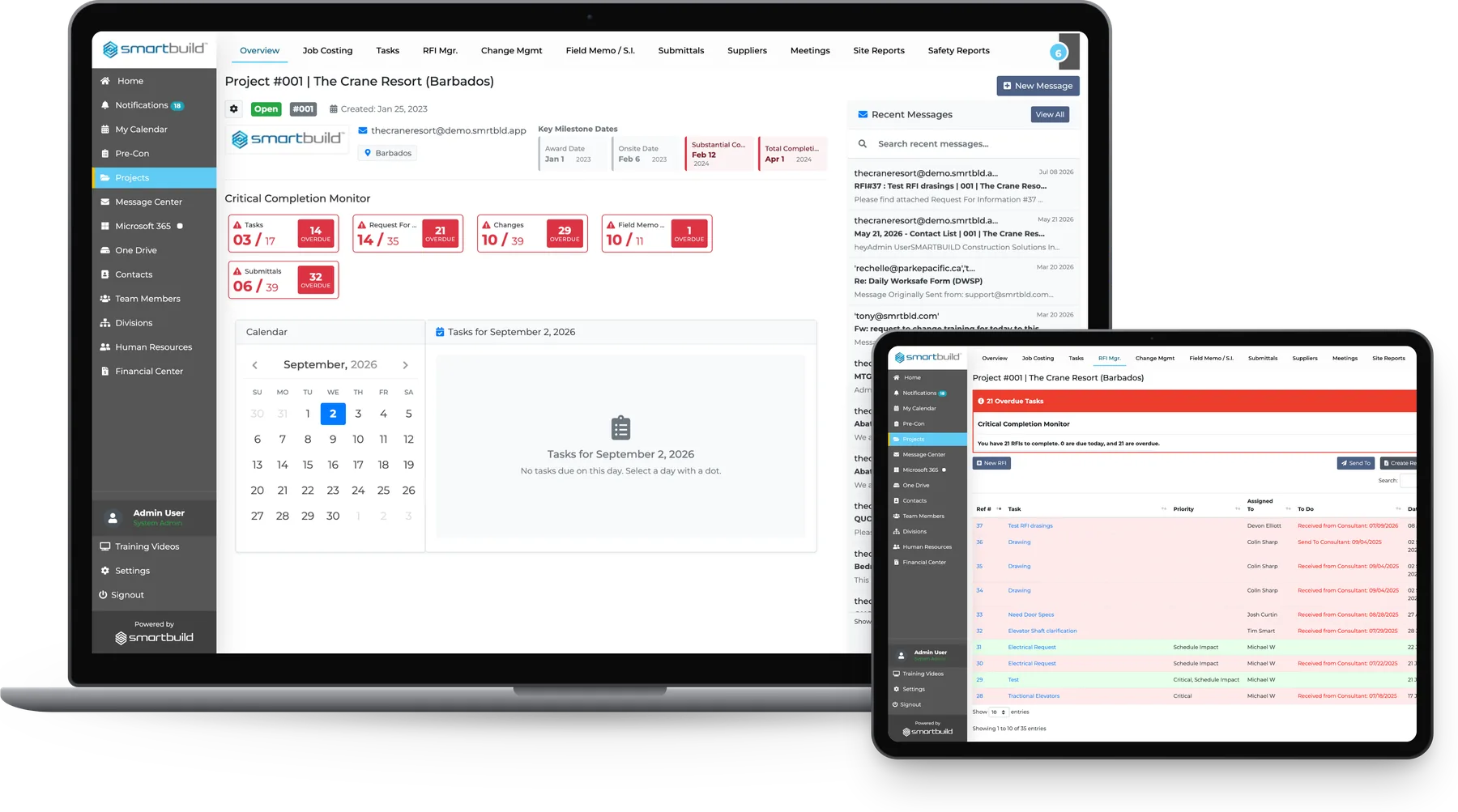
smrtGC on a laptop and a tablet: the project overview for The Crane Resort with the Critical Completion Monitor, milestone dates and recent messages, and the RFI Manager register beside it
Dakon Construction Ltd.E.P. Guidi, Inc.Esposito Bros. Construction Ltd.GBC Design BuildGEN-PROInter-All Ltd.K & L Construction (Ontario) Ltd.Kaiser Martin GroupLimestone Building Group, LLCMohawk Northeast, Inc.Parke PacificReinheller BuildersWestdell Development Corporation

We designed our platform from real construction experience

Every module in smrtGC started as a problem on a real commercial job and was solved by someone who had run jobs like it.

We are the only platform built by a real general contractor.

The old way

Spreadsheets & memory

  • Job status kept in the PM's head
  • RFIs tracked in a spreadsheet tab
  • Pay app rebuilt at month-end
  • Version disputes at closeout
  • Works for one job but breaks down at three

Legacy platforms

Procore, Autodesk

  • Six months to get up and running
  • Half the team doesn't use it
  • Paying for modules the team doesn't need
  • Built for firms with IT departments
  • Status calls still happen

The modern way

  • Live in 10 to 14 days
  • Every PM on it from day one
  • Flat-fee pricing
  • Connects with Microsoft 365
  • One screen shows every active job
Zulq Malik walking three visitors through the platform at the SMARTBUILD booth

Your PMs are running into the same issues

These three problems come up on almost every commercial GC job.

RFIs sit unanswered in inboxes

A PM sends an RFI on Monday and by Friday the crew is still waiting. Without one place to see every open item across all jobs, nobody knows what is overdue until someone calls to ask.

Two workers in hard hats and high-visibility vests standing still on either side of an open excavation on a commercial jobsite, one holding an unused shovel, the excavators behind them stopped

Crews work from different drawing revisions

One sub is building from last month's drawings while the super has the current set. Nobody notices until closeout, and by then the rework is paid for and the change order is in dispute.

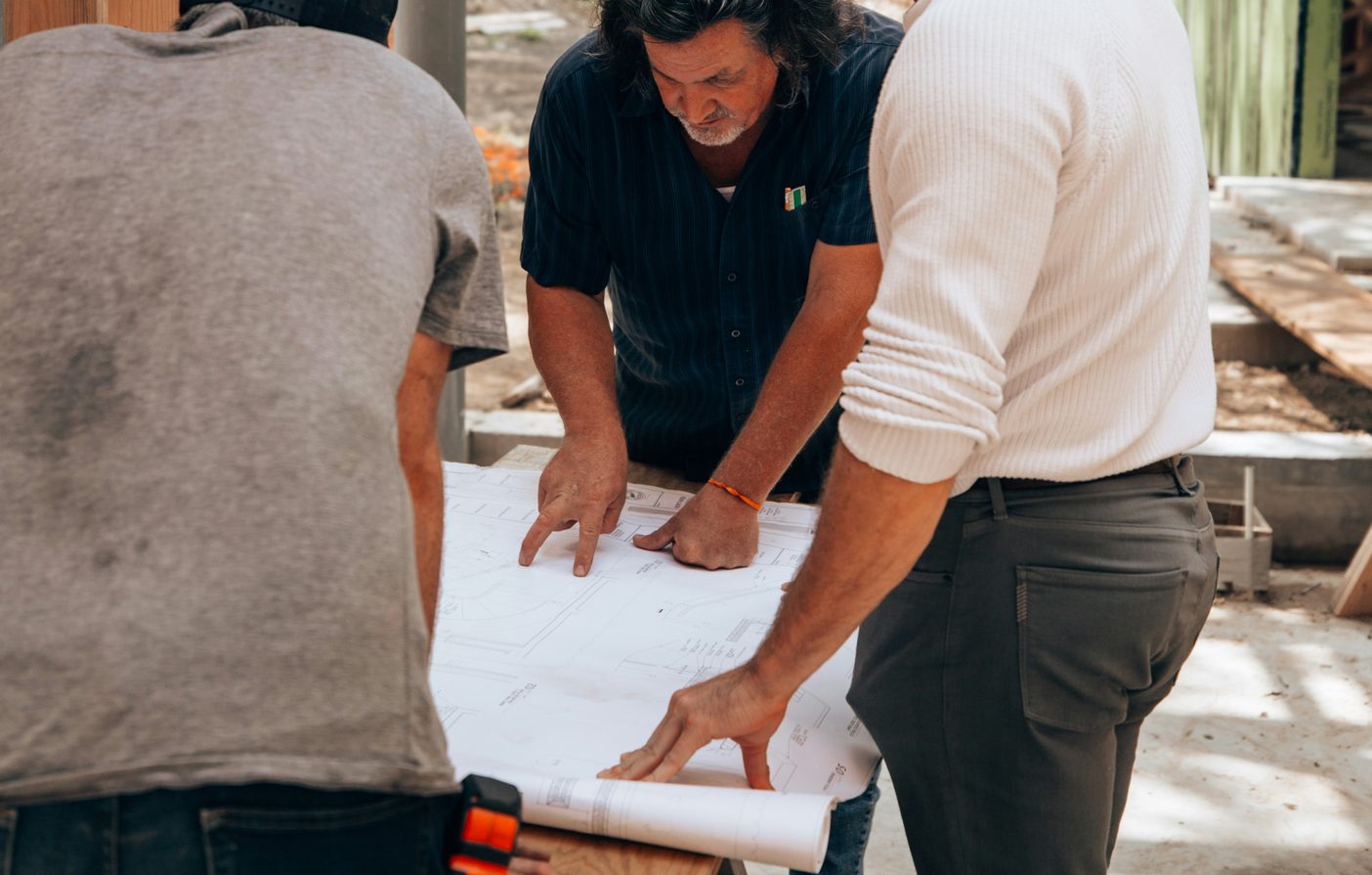
Three people leaning over a large paper drawing set spread on a plywood table at an active jobsite, hands pointing at the sheet, a second roll of drawings still rolled up beside it

Pay apps get rebuilt from memory at month-end

At month-end the PM spends evenings digging through emails, delivery records and photos to put the pay app together. That is time not spent on the next job.

A hand on a laptop trackpad after dark, a spreadsheet open on the screen, beside printed paperwork, a floor plan and marker pens spread across a warm-lit wooden desk

Here's how we help

What changes when PMs work from one record across every active job

Today On smrtGC
A PM calls around to check RFI status across three active jobs, which takes half the morning.The Critical Completion Monitor shows every overdue item across all jobs on one screen, so no calls are needed.
A sub calls to ask if their submittal was approved. Nobody in the office knows for sure.Submittal status updates in real time. The sub gets notified the moment it moves forward.
At month-end, the PM rebuilds the pay app from email threads, downloaded photos, and memory.Daily logs, photos, and deliveries are already recorded, so the pay app draws from live data.
A contractor checking a tablet on site beneath a tower crane

Field-tested construction workflows

Each module in smrtGC was built to solve a specific problem that comes up on commercial GC jobs. Some came from watching a PM lose an hour every morning making status calls. Some came from a closeout dispute that should never have happened. All of them came from the field.

Stay on top of the work

smrtGC shows what is overdue before it becomes a problem.

Project Management (incl. Critical Completion Monitor)
Every active job has a live overview, and the CCM flags overdue items in real time across all of them.
Tasks and Milestones
Each task is assigned to a person and a job with a due date. Overdue items appear in the CCM automatically.
RFI, Changes and Submittals
Every item has a live status, owner, and due date. Closeout packages pull from the same record.

Every open item is visible across every active job.

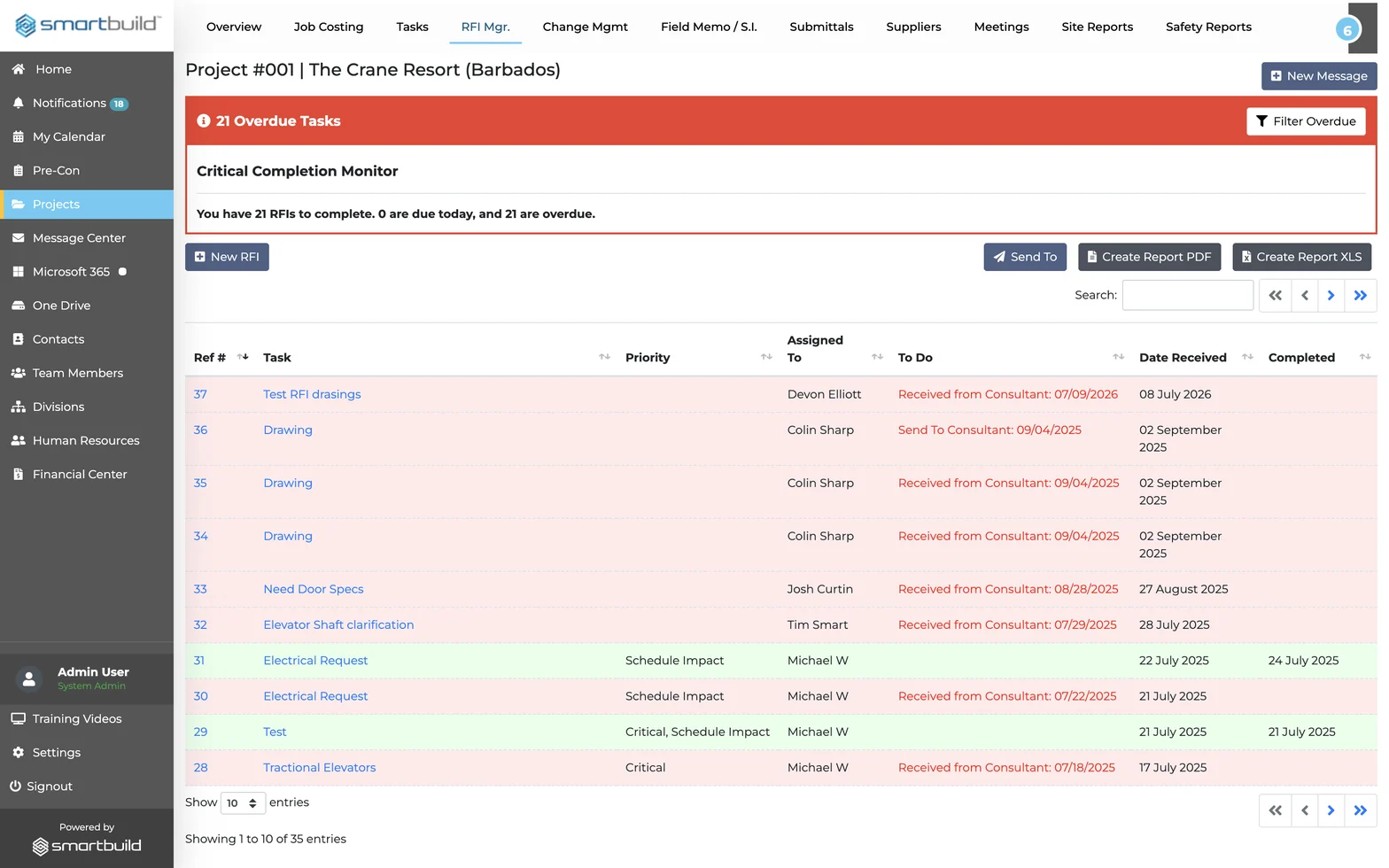
The RFI Manager in smrtGC — the Critical Completion Monitor banner flagging overdue RFIs, above the full RFI register with each request logged by reference number, priority, owner and dates

Keep the team aligned

The team keeps working in Outlook and Teams.

Integration with Microsoft 365
Every item has a live status, owner, and due date. Closeout packages pull from the same record.
Contacts, Suppliers and Team Members
Every PM, sub, supplier, and consultant is linked to the jobs they work on, with their scope, commitments, and correspondence kept in the project record.
Meetings
Agendas, minutes, and action items are logged in the project record with owners and due dates.

Microsoft 365 runs inside smrtGC, so there is no new tool to learn and no duplicate entry.

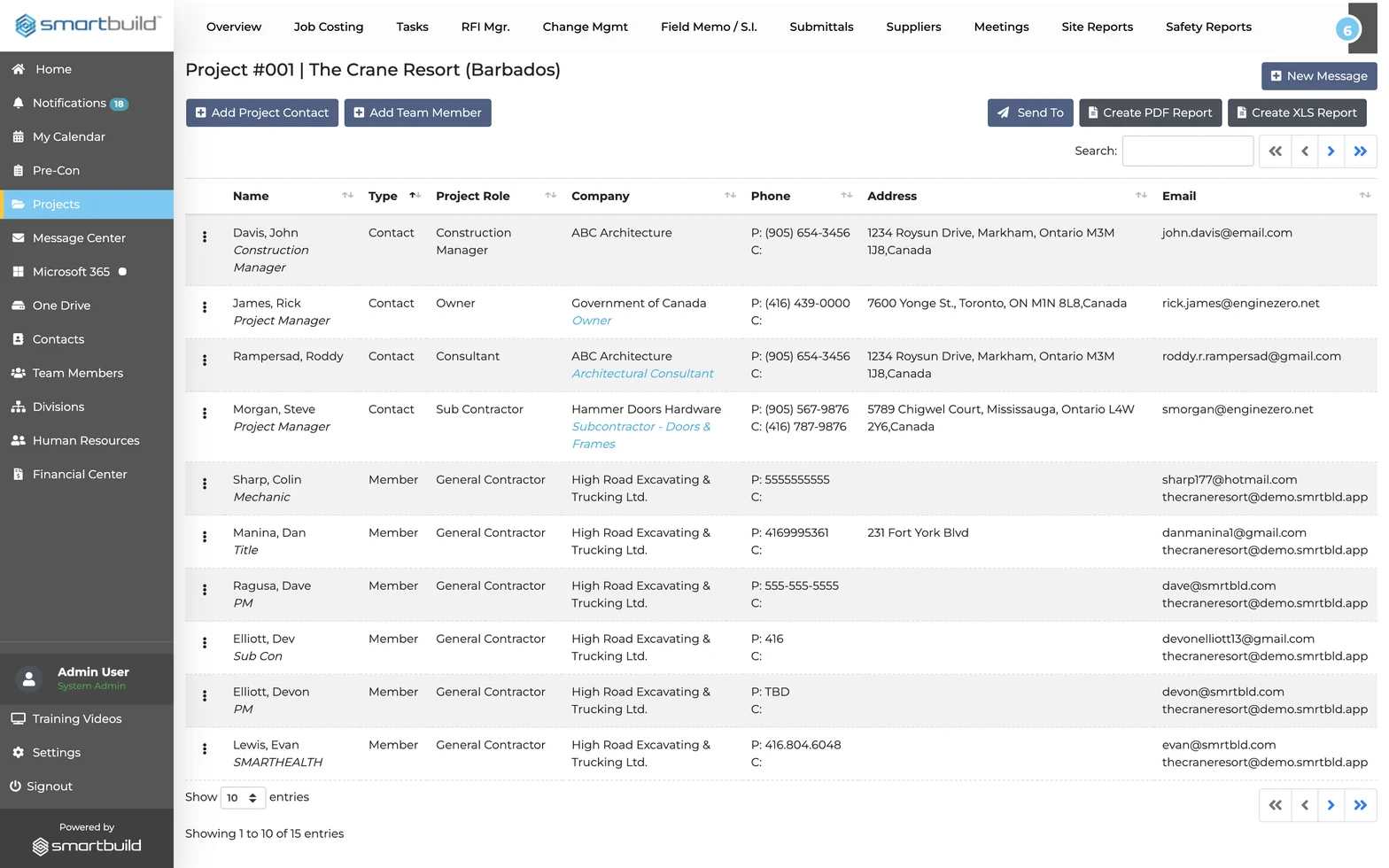
The Project Team roster in smrtGC, listing every contact and member on the job with their type, project role, company and contact details

Capture your field data

Field data is recorded the day it happens.

Schedules
The job schedule is built and updated inside smrtGC, and every change reaches the whole team at once.
Photos
Field photos are uploaded from any phone and tagged by date, location, and trade. Finding pay-app backup takes a date-range search.
Safety and Site Reports
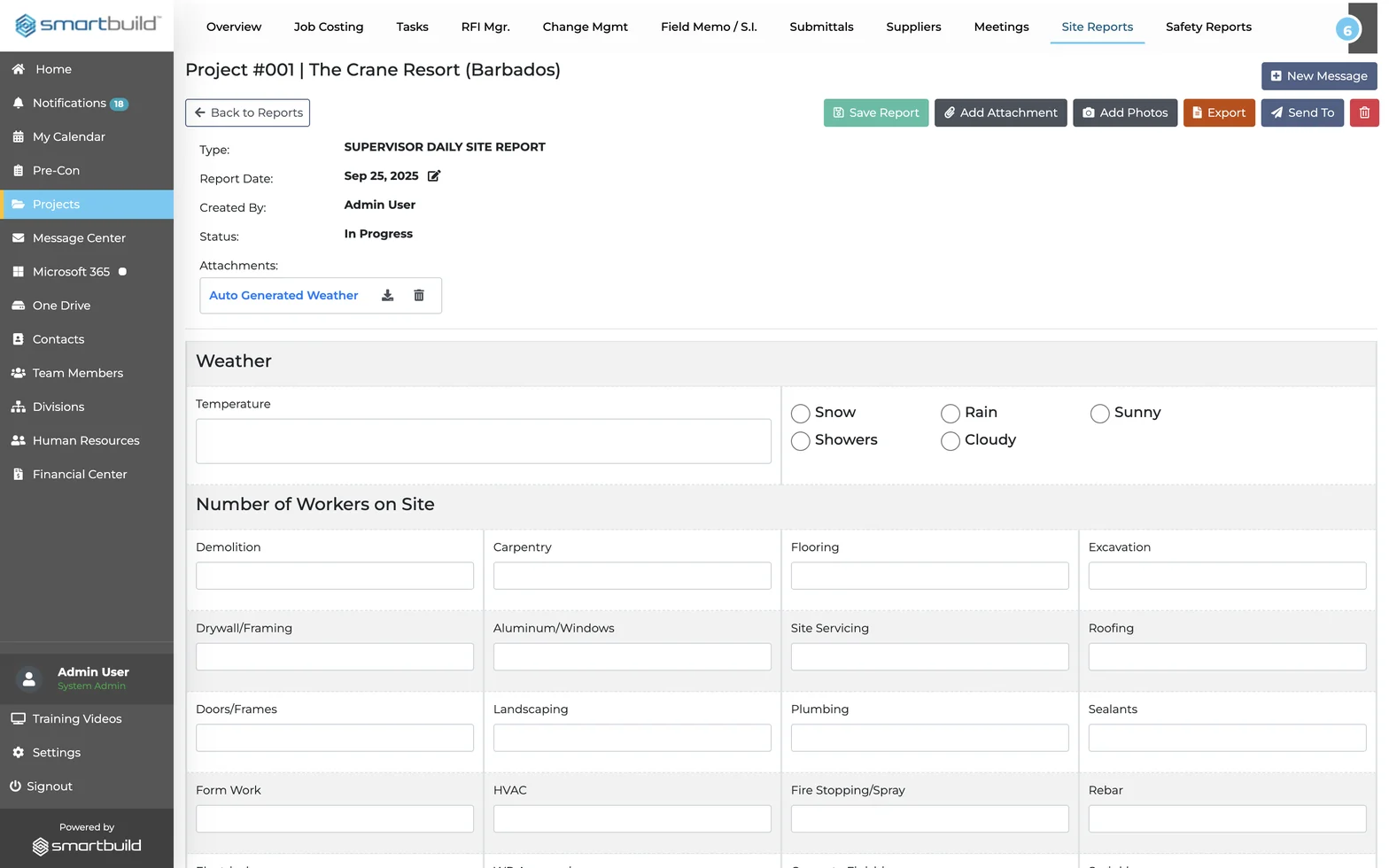
Daily logs are filed from the field before the crew leaves the site. With smrt-E, foremen can dictate them by voice, so the record is ready before the PM gets to the office.

Everything is filed by the end of the shift, so nothing has to be reconstructed later.

A supervisor daily site report in smrtGC — the weather panel and the number-of-workers-on-site counts broken out by trade

Here's what our customers are saying

"The software is very intuitive. Easy to find things, easy to go across the dashboard, easy to use."

David Leinbach

President

Kaiser Martin Group

3.5 years with SMARTBUILD and still getting better.

50%less paperwork
30%more productive on the office side
10–20%less than per-seat software

"Since adopting SMARTBUILD, we have seen a 50% improvement in task performance. PMs now manage more projects, and the SMARTBUILD team is always accessible."

Shaun Dawson

President

GEN-PRO

Switched from Procore in 2023

A GC that moved off Procore and rebuilt their PM workflow on smrtGC, eliminating per-seat costs and giving PMs the capacity to take on more jobs.

50%improvement in task performance
5projects per PM, up from 3
Flat rateno per-seat penalty for growth

Questions GC project managers ask us most

How long does it take to get up and running on smrtGC?

Most GC teams are live on smrtGC in 10 to 14 days. We migrate active projects from spreadsheets and existing tools, so the team never works in two systems at once. Setup is hands-on and guided instead of a video library the team works through alone.

Can our team keep using Microsoft 365?

Yes. smrtGC integrates directly with Microsoft 365. Outlook emails become RFIs or tasks in one click, SharePoint syncs the plan room and closeouts, and Teams notifications are routed by project and trade.

How does smrtGC manage RFIs across multiple active jobs?

Every RFI sits in its project record with a live status, assignee, and due date. The Critical Completion Monitor shows every overdue RFI across all active jobs on one screen. For RFIs raised in the field, smrt-E lets crews file by voice with a photo, and the PM reviews each one before it goes to the architect.

How do GC project managers handle more jobs without burning out?

GEN-PRO's PMs went from 3 projects each to 5 after switching to smrtGC. Status calls, inbox chasing, and end-of-day report assembly are replaced by a system that keeps everything current on its own.

What does smrtGC cost?

smrtGC is priced as a flat fee rather than per user or per project. One rate covers the whole team across all active jobs, and the price does not rise when a firm hires a PM or adds a job. Pricing is based on firm size, and a 30-day pilot is available before an annual commitment.

How is smrtGC different from Procore?

Procore was built for large firms with IT departments, takes 6–12 months to onboard, and charges based on revenue. smrtGC has a flat rate based on the modules a firm selects, goes live in 10–14 days, runs inside Microsoft 365, and was built by a working general contractor. It does not need an IT team.

See smrtGC running on one of your own jobs

The demo shows what Monday morning looks like on smrtGC using one of your active jobs, including the Critical Completion Monitor, the RFI queue, and the supplier log.

  • Live in 10 to 14 days
  • Flat fee
  • Unlimited users and projects
  • Native integration with Microsoft 365
Zulq Malik talking with three visitors on the floor at ConExpo